Audit Collector Workload
Audit collectors send audit data to the Verify Privileged Identity Platform, so recorded activities and events can be displayed.
Audit collectors function as intermediary services that receive and compress real-time activities captured by agents deployed on audited computers. Additional collectors can be deployed at any point for additional resiliency or improved scale.
We recommend setting up at least two collectors to ensure uninterrupted auditing.
The agent on each audited machine captures user activities and forwards them to a designated collector. When the agent cannot establish a connection with a collector—such as when computers hosting the collector service are offline for maintenance—the agent temporarily stores the session data locally. When the connection is reestablished, the agent transfers this session data to the collector. The collector then transmits the data to the Verify Privileged Identity Platform.
Editing Audit Collector Settings
-
In the platform UI, open the Sites page. (Use the Search bar to find it.)
-
Select a site.
-
Select the Settings tab.
-
On the Audit Collector workload panel, click Edit (pencil icon).
- Modify any of the Audit Collector workload settings in the following table.
| Setting | Description |
|---|---|
| Send Session Recordings to Platform | When enabled, session recordings are sent from the collector to the platform for analysis and storage. |
| Port Number | 5063 TCP is used by default. The Audit Collector listens on this port. Agents deployed on audited computers forward their captured user activities to the Audit Collector using this port. |
| AD Sites |
Enter a comma-separated list of Active Directory sites from which the Audit Collector is to receive data. Use this setting to limit which audit agents can connect to the Audit Collector. |
| IP Subnets |
Enter a comma-separated list of network subnets, specified in CIDR notation. Use this setting to limit incoming data to only specified network connections. |
Audit Collector Account Permissions
The permissions described in this section are needed only when you use the Audit Collector as a standalone workload, without the Command Relay, as when using Verify Privilege Server Suite with the Verify Privileged Identity Platform. If you are using the Command Relay workload, it takes care of all the permissions that are needed.
For information about using Verify Privilege Server Suite with the Verify Privileged Identity Platform, see Server Suite on the Verify Privileged Identity Platform.
On the server where you will install the Platform Engine and the Audit Collector workload, define a service account for Audit Collector, then configure the account with local server permissions, domain permissions, or domain administrator permissions (temporary) as described in the next few sections.
If you do not want to grant any of your organization's users full control at the root level, create the DelineaPlatform OU and grant IBM Security full control over it. IBM Security then takes care of all child objects in the OU. At a minimum, you must grant IBM Security read permissions at the root.
Local Server Permissions
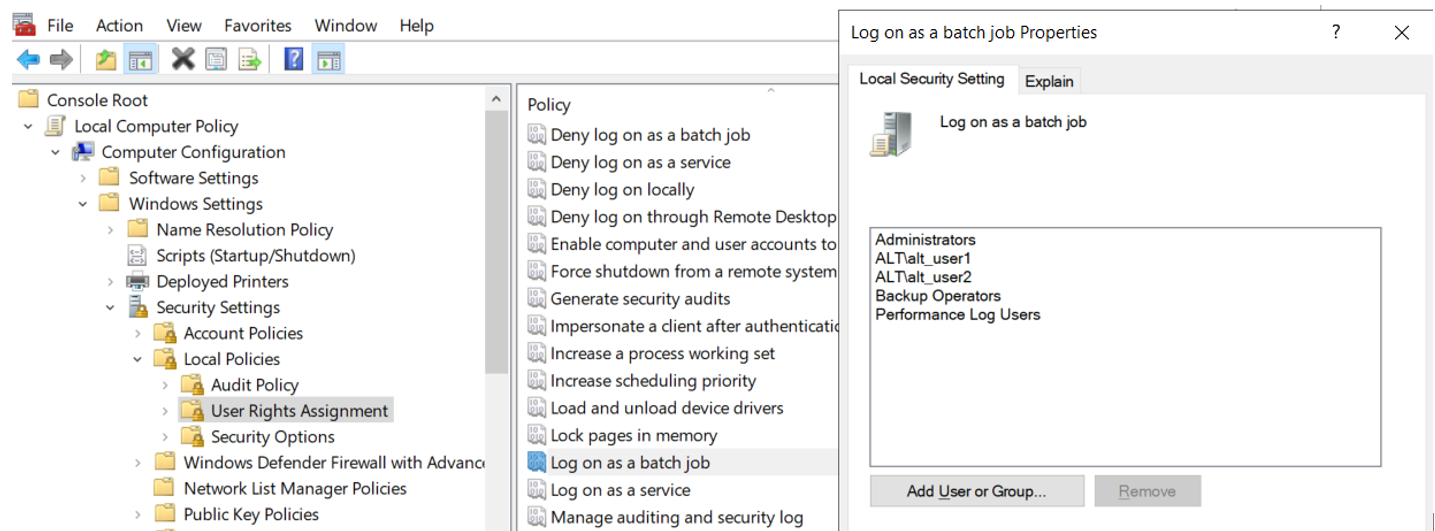
With local permissions on the server where the Verify Privileged Identity Platform Engine and Audit Collector will be installed, the Audit Collector service account can create the DelineaPlatform OU manually before running the setup for Audit Collector. The local server permissions must include the Log on as a batch job permission in order for PCS to work.
To assign the Log on as batch job permission:
-
Select Local Computer Policy > Computer Configuration > Windows Settings > Security Settings > Local Policies > User Rights Assignment.
-
Select the Log on as a batch job permission.
-
On the Local Security Setting tab, click Add User or group.
-
Navigate to and select the Audit Collector service account to apply the permission.
The Log on as batch job permission is granted by default to all members of these three AD groups:
- Administrators
- Backup Operators
- Performance Log Users
Domain Permissions
An object named OU=DelineaPlatform must be created at any desired location in the domain. Permissions giving Full Control to create the OU=DelineaPlatform object and all child objects must be given to the Audit Collector service account. In the Permissions section of the Permission Entry dialog, every checkbox must be selected.
Audit Collector Data Encryption
As data moves from the Audit Collector to the platform agent, it is encrypted.
The HTTPS protocol is used for communications between the Audit Collector workload and the platform agent, as well as between the Audit Collector and the platform itself.
The TLS version used in these communications is at least TLS 1.2. With more recent versions of the platform agent (6.2.1) and Windows Server version of 2022 or greater, TLS 1.3 can be used. The strength of the cipher suite is also influenced by your own organization's business policies.
Video data (encoded segments) are encrypted in transit using an AES session key negotiated with IBM Security Insights. For more information, see Insights.