Authenticated Message Action Logon Behavior
This instruciton guides you through setting up the registry entries required to adjust the logon type performed by the following Verify Privilege Manager authenticated message actions, which by default is the network logon type.
Registry Key Configuration
When a specific registry value is present, authenticated message actions performed by ArelliaDisplayXamlAction.exe will use the interactive (or batch) logon type instead of the network logon type.
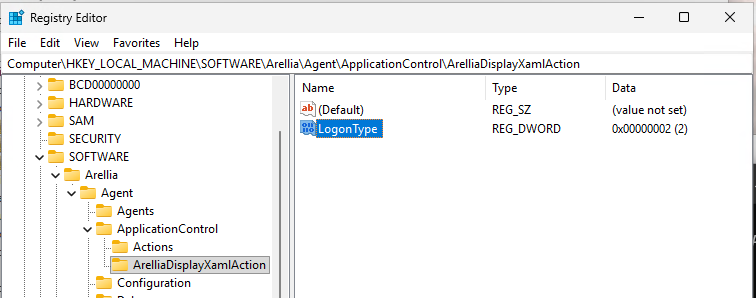
HKEY_LOCAL_MACHINE\SOFTWARE\Arellia\Agent\ApplicationControl\ArelliaDisplayXamlAction
LogonType type is DWORD, with the following valid values:
-
0x2 (Interactive)
-
0x3 (Network)
-
0x4 (Batch)
If missing or present with an invalid value, then a value of 0x3 (Network) is used so that the original behavior for authentication is maintained.
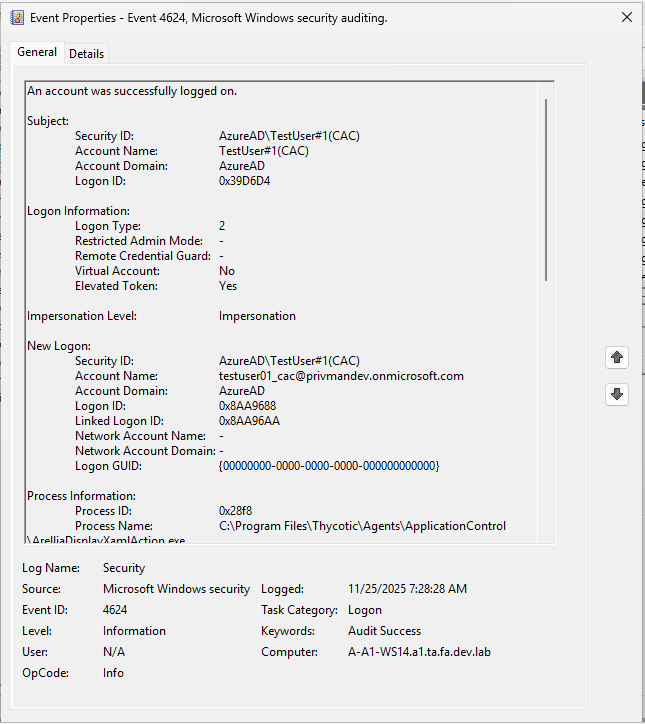
The following example from the Registry Editor (RegEdit.exe) shows the override set for the Interactive logon type, along with another example showing the audit entry with a Logon Type of 0x2 (Interactive).